Docs
The manual, short.
Everything you need to run MAFDET and understand what it shows you. The README on GitHub is the long form and stays the reference.
Quick start
Windows, with a double-click. Download MAFDET (on GitHub, Code → Download ZIP, and unzip it; or git clone) and double-click start_mafdet.bat. The first time it creates a Python environment in .venv and installs MAFDET, about a minute; it needs Python 3.10 or later. After that, a double-click opens MAFDET in under a second.
macOS, with a double-click. The same, with start_mafdet.command. If the Finder says it cannot verify the file, right-click it, Open, then Open again; only the first time.
From PyPI. On macOS with Homebrew's Python, and on recent Ubuntu and Debian, pip install outside a virtual environment stops with externally-managed-environment: use pipx, which gives MAFDET an environment of its own.
$ brew install pipx        # Ubuntu/Debian: sudo apt install pipx · Windows: py -m pip install --user pipx
$ pipx ensurepath          # then open a new terminal
$ pipx install mafdet
$ mafdet
On Windows with Python from python.org, pip install mafdet works as it is. To update: pipx upgrade mafdet (or pip install -U mafdet).
From the source, also for the measurements in research/:
$ git clone https://github.com/TheLastOxygen/mafdet.git
$ cd mafdet
$ python -m venv .venv          # Windows: py -3.12 -m venv .venv
$ source .venv/bin/activate     # Windows: .venv\Scripts\Activate.ps1
$ pip install -e .
$ mafdet
Either way, no PyTorch and no manual downloads: MAFDET asks whether to open the window or the terminal app, and the first start guides you through the rest. It looks at your machine, installs the right build of llama.cpp (CUDA for an NVIDIA card, Vulkan for an AMD Radeon, Metal on an Apple Silicon Mac, CPU otherwise) and downloads the model that runs best on your hardware.
The app
The same app comes in two forms, on the same engine:
| Command | What it is |
|---|---|
mafdet gui | The window: chat, models, hardware and settings, in English, Italian, French or German. |
mafdet tui | The terminal app: the same views in the terminal, keyboard first (F1 to F4), on an amber phosphor screen with a boot sequence. Settings, Cinematic effects, turns the animations off. |
mafdet models | The model catalog for this machine (--family, --download, also --download repository:file.gguf from Hugging Face). |
mafdet doctor | Checks the GPU, memory, llama.cpp and the models; --install installs llama.cpp (--build 12, 13, vulkan or cpu to pick the build). |
mafdet alone opens the launcher, which can remember your choice (mafdet --ask shows it again).
Chat
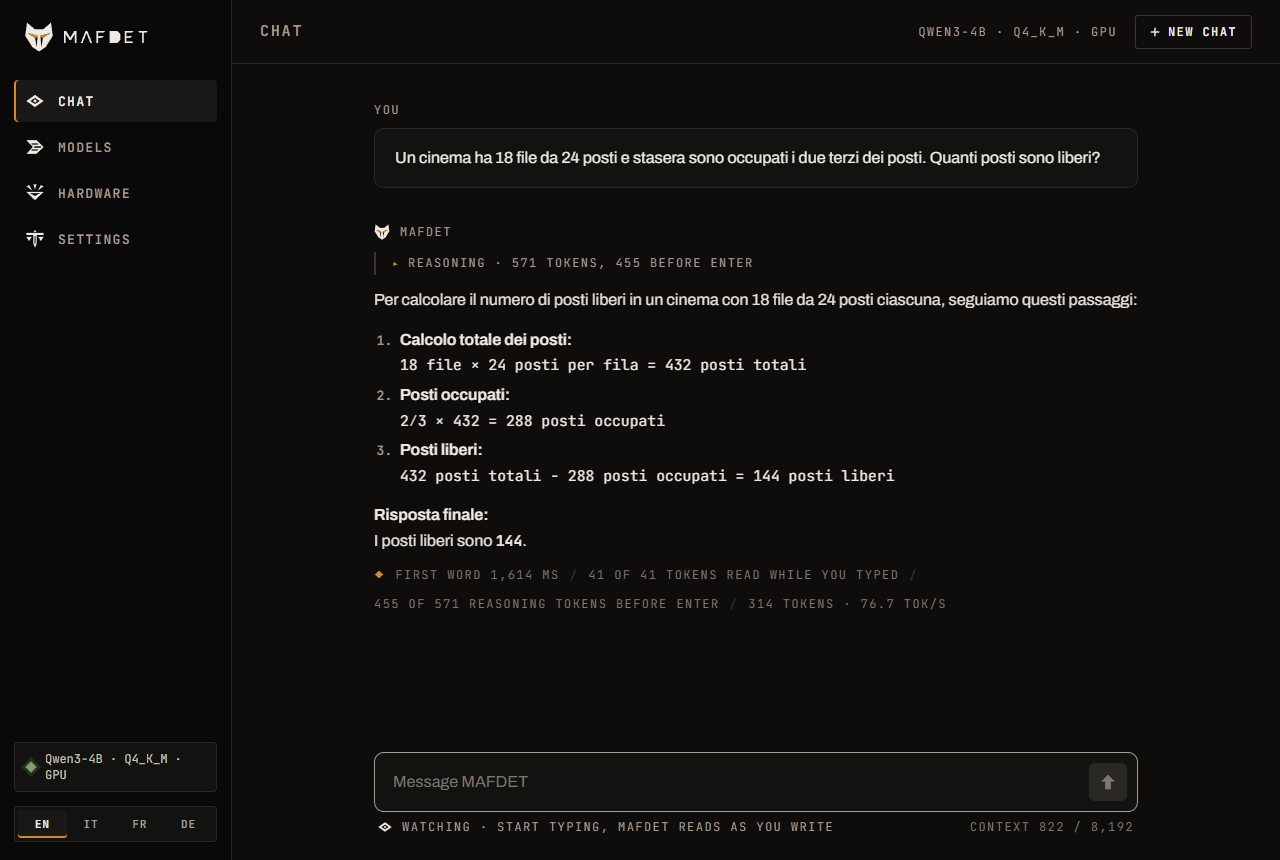
While you type, a status line under the message shows what the model is doing with it: how much it has read, and how many reasoning tokens it has written ahead (the field glows amber while it thinks). On Enter only the tail is left to compute. The reasoning is shown folded above the answer, and every answer ends with its numbers: first word after Enter, tokens read while you typed, reasoning done before Enter, speed.
Models
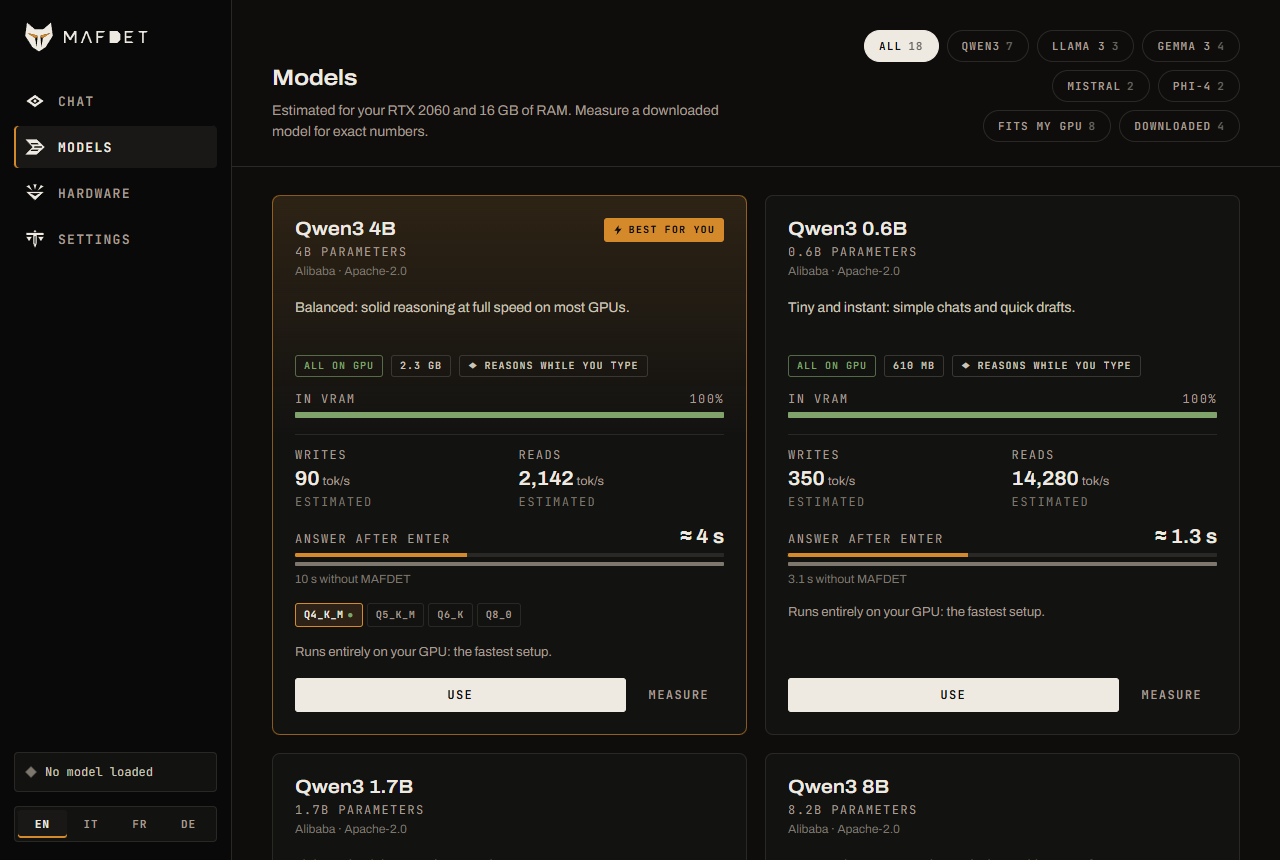
Five families: Qwen3, Llama 3, Gemma 3, Mistral and Phi-4, from 0.6B to 32B parameters, each in several quantizations. With every model, MAFDET reads your message while you type and, at a pause, writes the answer ahead; Qwen3 also reasons ahead, the one family whose reasoning frame was measured.
Every model of the catalog comes with what it does on your machine, before you download it: whether it fits in VRAM or runs partly on the CPU, how fast it writes and reads, and for Qwen3 how long the answer takes after Enter with and without MAFDET. The estimate comes from your hardware (GPU and RAM bandwidth, VRAM, llama.cpp's split of layers between GPU and CPU) and is within 12% of the measured speeds on the reference PC and on an M2 Pro. Once a model is downloaded, Measure benchmarks it in half a minute and the real numbers replace the estimate. The model that runs best here is marked Best for you, and each family has its own best pick.
Your own models
Any GGUF works too, beyond the catalog:
- Search Hugging Face (Models view) finds GGUF repositories, the most downloaded first, and lists their files with the same estimate for your machine; a quantization is suggested (Q4_K_M when there is one). The download resumes where it stopped, all parts of a split model together, into
~/.mafdet/models/hf/<owner>/<repo>/. Gated models (Llama, Gemma) need their license accepted on huggingface.co andhf auth loginon the machine. - A file downloaded by hand: put it in
~/.mafdet/models(any subfolder), or pick it anywhere on disk with Add a GGUF file (it stays where it is).
They appear under Your models, with the numbers read from the file's header and Measure as for the catalog. The tokenizer and the chat template are the GGUF's own, read through llama-server. A Qwen3 with thinking mode reasons ahead while you type; any other model reads while you type and writes the answer ahead at pauses. The architecture must be one the installed llama.cpp supports.
Thinking ahead
In the app this is on by default for Qwen3 (Settings, Reason while I type); from the command line it is mafdet strike. The model runs in thinking mode, so before answering it reasons in a hidden block. That reasoning is usually the longest wait, and MAFDET moves as much of it as possible to before Enter:
- While you type, the model reasons in short chunks of 32 tokens, on the message as it is at that moment, on whole words.
- When the text changes, the reasoning is not thrown away. It stays in the prompt as notes after the new version of the message, which only costs a prefill, and a new line of the notes names the words just typed, so the model goes on gathering material on them instead of starting over.
- On Enter, a last sentence tells the model that the message is complete. It finishes reasoning from where it got to and answers.
The notes are a list of material for the answer, started by a frame: for each key term, name or number already written, one line with what it is and the facts the model knows about it, or a partial result. The frame matters: without one, the model spent its notes remarking that the message was unfinished. If you pause and send the message unchanged, MAFDET also writes the answer itself ahead; that part is exact and holds for the exact text it was written for.
| Option | What it does |
|---|---|
--no-think | No reasoning: answer right away, and write ahead only the exact answer. |
--think-ahead N | Longest reasoning kept across edits (default 1024 tokens). |
--ahead N | Answer tokens written ahead when the text does not change (default 512). |
--branches N | Experimental: the model also guesses how you will finish the message and, on a slot of its own, reasons on the guess. 1 is the measured setting. |
--recycle | Reuse the answers written for earlier versions of the message as n-gram drafts for speculative decoding (+4% decode speed measured with natural typing, +20% on code). |
--draft repo:file | A small model of the same family drafts tokens for speculative decoding (no gain measured on the RTX 2060). |
mafdet watch and mafdet strike open the window with the model and options given on the command line (--gguf repo:file), instead of the app's settings. demo_live.py (start_demo.bat) is the step-by-step view for debugging: tokens, cache, hold-back and timings, live in the terminal (--auto types an example by itself).
Commands
| Command | What it does | |
|---|---|---|
mafdet | the launcher | Window or terminal; remembers your choice. |
mafdet gui | the window | Chat, models, hardware and settings. |
mafdet tui | the terminal app | The same views, keyboard first. |
mafdet models | the catalog | The models for this machine; --download. |
mafdet doctor | the awakening | Checks the GPU, memory, llama.cpp and the models; --install. |
mafdet watch | the watch | The chat window with a model from the command line. |
mafdet strike | the strike | Reasoning ahead while you type, with the options above. |
mafdet hunt | the hunt | Simulates people typing and measures the wait after sending. |
mafdet race | the race | Benchmarks prefill and decode on your machine. |
mafdet judge | the judgement | Checks results against a from-scratch computation: must end with 0 errors. |
mafdet awaken | the awakening | Checks PyTorch and the GPU, for the PyTorch backend. |
mafdet --help is the full guide, mafdet <command> --help the options of one.
Measure and verify
The measurements run on llama.cpp with --backend llama (no PyTorch needed), or on PyTorch/transformers with the default --backend hf (pip install -e ".[research]" after installing PyTorch from the CUDA index). Add --device cpu to any command to measure the no-GPU case. Results are saved as CSV files in results/ (change it with --out).
mafdet hunt replays three typing scenarios (--scenario):
- clean: a message typed from start to finish
- messy: typos fixed with backspace, a word deleted and retyped, an insertion in the middle, little punctuation
- paste: a long document pasted in, followed by a typed question. This is where the gain is largest.
The typing is not replayed in real time. Each prefill really runs on the model, and its measured duration is placed on the typing timeline. If the model falls behind the typist, the delay piles up and is added to the final wait, just as in a real system.
Hardware and settings
The Hardware view shows the GPU, CPU, memory and the llama.cpp runtime, with a button to install or reinstall it. Settings keep the chat options from one start to the next, in ~/.mafdet (or $MAFDET_HOME): Reason while I type, the answer written ahead, the reasoning kept across edits, and the experimental options.
mafdet doctor says what it found. An issue with its output and the server*.log files next to llama-server (in ~/.mafdet/llama.cpp) is the most useful report.